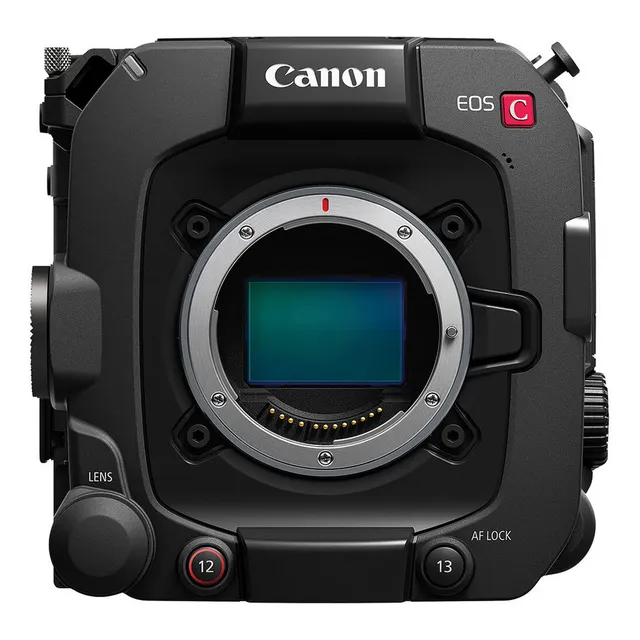
Technical specifications
- Sensor
- Full-Frame BSI Stacked CMOS
- Sensor Size
- Full frame
- Megapixels
- 19.05
- Mount
- Canon RF
- Max Resolution
- 6K (6000x3164)
- Max Frame Rate
- 180fps @ 1080p
- Codec
- H.265
- Dynamic Range
- 16 Stops
- ISO Range
- ISO 100–102400
- Log / Gamma
- Canon Log 2, Canon Log 3
- Autofocus
- Dual Pixel CMOS AF II
- Stabilization
- Digital, 5-Axis
- ND Filter
- 2–10 stop (5-position wheel)
- Ports
- 1x BNC (12G-SDI), 1x BNC (3G-SDI) Monitor, 1x HDMI, 2x Mini XLR, 1x 1/8" / 3.5 mm TRS Stereo Microphone Input on Camera Body, 1x 1/8" / 3.5 mm TRS Stereo Headphone, 1x XLR 4-Pin (12VDC), 1x USB-C Monitor, 1x DIN 1.0/2.3 (Genlock, Return, Sync), 1x DIN 1.0/2.3 (Timecode), 1x RJ45 (XC) Control, 1x Hirose 12-Pin (Lens Control)
- Battery
- Canon BP-AN Series
- Weight
- 1500g
- Dimensions
- 142 x 135 x 135 mm
- MSRP
- $7,999
- Released
- 2024
Add your voice
Your ratings help other filmmakers choose the right camera.
Own it?
What do you use this for?
Field guide
Overview
The Canon EOS C400 is a powerful, versatile digital cinema camera designed to bridge the gap between high-end production and agile, run-and-gun workflows. Positioned as a robust tool for professional cinematographers, it offers a full-frame sensor and advanced internal recording capabilities that make it a formidable competitor in the cinema market. Its modular design allows for a wide range of configurations, from a stripped-down handheld setup to a fully rigged production build, making it equally at home on a documentary shoot or a narrative set.
What sets the C400 apart is its sophisticated workflow integration, supporting 6K/4.3K RAW recording internally to CFexpress cards while simultaneously capturing 2K proxy files to SD cards. This dual-slot architecture, combined with advanced features like the ACES workflow support and in-camera lens correction, provides a streamlined post-production path. The camera also boasts extensive connectivity, including SDI, HDMI, and Ethernet terminals, ensuring it fits seamlessly into professional live and studio environments.
This camera is an excellent choice for filmmakers who need high-quality, reliable performance across diverse production types. Whether you are shooting high-end commercials, feature films, or fast-paced documentary content, the C400 provides the necessary tools to capture high-fidelity footage with a flexible, efficient workflow.
Pros & Cons
Pros
Internal 6K/4.3K RAW recording to CFexpress cards provides maximum image quality and flexibility for post-production grading.
Simultaneous recording of 2K proxy clips to SD cards significantly speeds up offline editing workflows.
Modular design with a removable handle, LCD monitor, and camera grip allows for rapid adaptation to different shooting styles.
Advanced connectivity including SDI, HDMI, and Ethernet terminals supports professional live streaming and external monitoring setups.
Comprehensive in-camera lens correction for peripheral illumination, chromatic aberration, and distortion improves image quality directly in-camera.
Cons
CFexpress cards can become extremely hot during operation, posing a risk of burns if removed immediately after recording.
The camera does not output signals to the MON. terminal and HDMI OUT terminal simultaneously, requiring careful planning for multi-monitor setups.
RAW recording is not supported for proxy clips or when using certain special recording modes, limiting workflow options in those scenarios.
The camera's sensor is larger than the APS-C sensor size for which RF-S/EF-S lenses are designed, leading to potential vignetting or peripheral illumination fall-off.
The complexity of the menu system and extensive customization options may require a significant learning curve for new users.
Best Settings
Narrative Filmmaking
Use the RAW recording format for maximum dynamic range and color grading flexibility. Set the base ISO to match your lighting conditions (e.g., Base ISO 800 for normal lighting) to optimize the signal-to-noise ratio. Use a 180-degree shutter angle for natural motion blur.
Documentary / Run-and-Gun
Record in XF-AVC or XF-HEVC S for a balance of high quality and manageable file sizes. Enable Continuous AF with Subject Detection to ensure critical focus during unpredictable action. Use the built-in ND filters to maintain your desired aperture in changing light conditions without needing external filters.
Interview & Talking Head
Set the camera to a standard picture profile like [Canon 709] for a ready-to-use look, or use Canon Log 3 if you plan to grade in post. Utilize the INPUT 1/INPUT 2 terminals for professional XLR audio, and set the audio level to manual to ensure consistent, clean sound levels.
Slow Motion
Use the [Slow & Fast Motion] recording mode. Note that sound is not recorded in this mode. Ensure your shooting frame rate is set higher than your playback frame rate (e.g., 60fps shooting for 24fps playback) to achieve the desired slow-motion effect.
Common Issues
Camera will not turn on or turns off by itself
What's happening: The camera fails to power up or shuts down unexpectedly. Why: This is typically caused by a depleted battery pack or a poor connection. Fix: Replace or charge the battery pack, or remove and reattach it to ensure a secure connection. Prevention: Regularly check the battery level on the status screen and ensure the battery is fully charged before important shoots.
Cannot charge the battery pack
What's happening: The battery charger does not charge the battery. Why: The battery temperature may be outside the safe charging range (0-40°C). Fix: Allow the battery to reach room temperature before attempting to charge it again. Prevention: Store and charge batteries in a temperature-controlled environment.
Pressing the REC button will not start recording
What's happening: The camera is in standby but won't begin recording. Why: The card may be full, the maximum clip limit (999 clips) may have been reached, or the REC button may be disabled in the menu. Fix: Delete unnecessary clips, initialize the card, or check the [Camera REC Button] settings in the [System Setup] menu. Prevention: Monitor card space and clip counts regularly during production.
The camera will not focus
What's happening: Autofocus is failing to lock onto the subject. Why: The subject may be difficult for the AF system (e.g., low contrast, repetitive patterns), or the lens may be dirty. Fix: Switch to manual focus and use the focus assistance functions like the focus guide or peaking. Prevention: Keep lens contacts and glass clean, and use manual focus for challenging subjects.
FAQ
- Can the Canon EOS C400 shoot 4K at 120fps?
The manual does not explicitly list 4K at 120fps as a standard recording mode. It does, however, support various frame rates for slow and fast motion recording, which are dependent on the system frequency and recording format.
- What memory cards does the Canon EOS C400 use?
The Canon EOS C400 uses CFexpress cards (compliant with CFexpress 2.0 Type B specifications) for primary recording and SD cards (SD, SDHC, or SDXC) for proxy clips, photos, and settings files.
- Does the Canon EOS C400 have built-in ND filters?
Yes, the camera features built-in ND filters. By default, it offers 3 density levels (up to 6 stops in 2-stop intervals), and if the extended ND range is enabled, it provides 5 density levels (up to 10 stops in 2-stop intervals).
- Can I record audio while using slow motion on the Canon EOS C400?
No, sound is not recorded when slow & fast motion recording is activated. However, if [S&F Clip / Audio (WAV)] is selected, audio (WAV) can be recorded to the card that is not the video recording destination.
- How do I update the firmware on the Canon EOS C400?
You can update the firmware by downloading the update file from the Canon website, saving it to the root directory of an SD card, and using the [Firmware] option in the [System Setup] menu while in CAMERA mode.
- Is the Canon EOS C400 weather-sealed?
No, the manual explicitly states that the camera is not waterproof and advises avoiding water, mud, or salt to prevent damage.
- Can I use EF lenses on the Canon EOS C400?
Yes, you can use EF lenses (including EF-S lenses and EF Cinema lenses) by using the optional EF-EOS R Mount Adapter.
- What is the maximum continuous recording time for a single clip?
A single clip can be recorded continuously for up to 6 hours. After that, a new clip is created automatically, and recording continues.
Recommended Accessories
- Canon RF 24-70mm f/2.8L IS USM — versatile zoom for full-frame coverage and excellent image quality. Shop on Amazon
- SmallRig V-Mount Battery Plate — powers camera and accessories for extended shooting times. Shop on Amazon
- Atomos Ninja V+ — external monitor/recorder for ProRes RAW monitoring and backup. Shop on Amazon
- Tilta Full Camera Cage — adds mounting points and protection for a robust rig setup. Shop on Amazon
- SmallRig Cage for C400 — adds mounting points for accessories, protects camera body. Shop on Amazon
- Canon BP-AN60 Battery — extended power for longer shoots, native fit. Shop on Amazon
Related comparisons
The EOS C400 brings full-frame 6K and RF mount to a lighter body, while the C300 Mark III remains a robust Super35 workhorse.
See full comparison EOS C400 vs FX6The Canon C400 offers superior 6K resolution and dynamic range; the Sony FX6 excels in low light and compact run-and-gun.
See full comparison