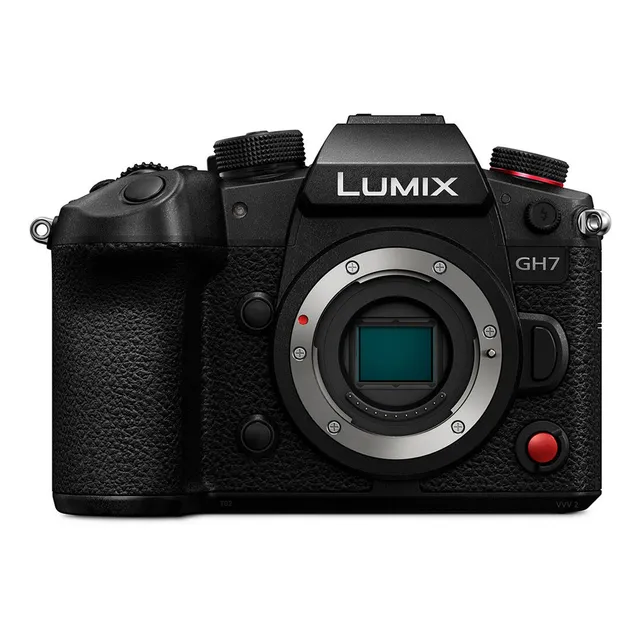
Technical specifications
- Sensor
- Micro Four Thirds BSI CMOS
- Sensor Size
- 17.3 x 13.0 mm
- Megapixels
- 25.2
- Mount
- Micro Four Thirds
- Max Resolution
- 5.8K (5760×4320)
- Max Frame Rate
- 120fps @ C4K
- Codec
- MP4 (H.264/H.265), MOV (H.265/H.264), Apple ProRes, ProRes RAW
- Dynamic Range
- 13 stops
- ISO Range
- ISO 100–51200
- Log / Gamma
- V-Log, HLG, Cinelike D2, Cinelike V2
- Autofocus
- Phase-detect, 315 points
- Stabilization
- Sensor-shift 5-axis IBIS + OIS
- Ports
- USB-C, HDMI, 3.5mm mic, 3.5mm headphone
- Battery
- DMW-BLK22
- Weight
- 658g
- Dimensions
- 138.4 x 100.3 x 90.1 mm
- MSRP
- $2,197.99
- Released
- 2024
Add your voice
Your ratings help other filmmakers choose the right camera.
Own it?
What do you use this for?
Field guide
Overview
The Panasonic Lumix GH7 emerges as a formidable tool for cinematographers, filmmakers, and content creators who demand high-end video capabilities in a compact, mirrorless form factor. Building on the legacy of the Micro Four Thirds system, this camera is positioned to compete in a market segment that values both portability and professional-grade features, offering a compelling alternative for productions ranging from independent films to demanding documentary work. It's designed for those who need robust internal recording options and advanced audio solutions without the bulk of larger cinema cameras.
This camera truly shines with its comprehensive video specifications, including internal 5.8K recording and the ability to output 12-bit RAW video data via HDMI to compatible external recorders. Filmmakers will appreciate the inclusion of Apple ProRes internal recording, alongside versatile MOV and MP4 codecs. A standout feature is its support for 32-bit float audio recording when paired with the optional DMW-XLR2 adapter, providing an exceptional dynamic range for sound capture. Furthermore, the GH7 boasts advanced image stabilization with 5-axis in-body, Dual I.S.2, and 5-Axis Hybrid E-Stabilization for video, ensuring steady shots even in challenging conditions. Professional monitoring tools like Waveform Monitor and Vector Scope are also built-in, streamlining on-set workflows.
Filmmakers and content creators looking for a highly capable, flexible, and relatively portable camera system should seriously consider the Lumix GH7. Its extensive codec support, high-resolution RAW output, and superior audio capabilities make it ideal for projects requiring significant post-production flexibility and pristine image and sound quality. Whether you're shooting a narrative short, a fast-paced documentary, or high-quality interviews, the GH7 offers the tools to elevate your production value, especially for those already invested in the Micro Four Thirds lens ecosystem.
Pros & Cons
Pros
Offers internal 5.8K (5760×4320) video recording, providing immense resolution and flexibility for reframing or downsampling in post-production.
Supports 12-bit RAW video data output via HDMI up to 5.8K to external recorders like Atomos Ninja V/V+ or Blackmagic Video Assist, crucial for high-end color grading workflows.
Enables 32-bit float audio recording with the optional DMW-XLR2 adapter, delivering an unparalleled dynamic range for sound capture without clipping.
Features dual card slots (CFexpress Type B and UHS-II SD) allowing for high-bitrate recording and flexible media management, including proxy recording.
Incorporates a highly effective 5-axis in-body image stabilizer, Dual I.S.2, and 5-Axis Hybrid E-Stabilization for video, providing up to 7.5 stops of stabilization for handheld shooting.
Includes professional video assist functions like Waveform Monitor/Vector Scope and Zebra Pattern, essential for precise exposure control on set.
Supports Log recording with V-Log and ARRI LogC3 (with optional upgrade key), offering extensive dynamic range and color grading potential.
Integrated Frame.io Camera to Cloud functionality allows direct upload of still images and proxy videos, streamlining collaborative post-production workflows.
Cons
High-bitrate MOV video (800 Mbps or more), Apple ProRes video (other than FHD), and all RAW video cannot be recorded to SD cards, necessitating more expensive CFexpress cards or an external SSD.
The optional DMW-BLF19 battery has significant limitations, disabling C4K+ resolution, high frame rates exceeding 60p, HDMI RAW output, external SSD recording, and streaming, making the DMW-BLK22 battery highly recommended.
Accessing the ARRI LogC3 picture profile requires an additional, optional Upgrade Software Key (DMW-SFU3A), adding to the overall cost for specific workflows.
Using [Boost I.S. (Video)] for fixed compositions requires manually turning it off via an Fn button if you need to change composition during recording, which can interrupt workflow.
Continuous AF can lead to faster battery drain; users are advised to set it to [MODE1] or [OFF] to conserve power, which might impact spontaneous shooting.
External SSDs, while offering expanded recording capabilities, may experience power issues or cause the camera to overheat during prolonged recording sessions, potentially stopping recording.
High frame rate video (e.g., 120p, 240p) is primarily available in MOV format, and specific recording qualities may have ISO sensitivity limitations at higher frame rates.
Best Settings
Narrative Filmmaking
For narrative work, where control over every aspect is paramount, prioritize the highest quality codecs and manual control. Set the System Frequency to [24.00Hz (CINEMA)] for that classic film look. For Rec. File Format, choose [Apple ProRes] to capture the most detail and provide maximum flexibility in post-production. Consider [5.7K/24p/RAW HQ] or [C4K/24p/422 HQ] for internal recording, or output 12-bit RAW Video Data via HDMI to a compatible external recorder for the ultimate quality. For audio, connect the optional DMW-XLR2 adapter and set [Sound Rec Quality] to [96kHz/32bit] or [48kHz/32bit] for pristine 32-bit float recording, ensuring no audio clipping. Use [Photo Style] [V-Log] or [ARRI LogC3] (with DMW-SFU3A upgrade) for extensive color grading latitude, and enable [Log View Assist] on the monitor/viewfinder for accurate monitoring. Focus should be [MF] (Manual Focus) with [Focus Peaking] set to [ON] and [Focus Peaking Sensitivity] adjusted for precise focus pulls. If on a tripod, set [Image Stabilizer] to [OFF]; if using anamorphic lenses, select [Anamorphic (Video)] and [Anamorphic Desqueeze Display] to match your lens magnification.
Documentary / Run-and-Gun
For dynamic, fast-paced documentary or run-and-gun shooting, a balance of quality, stability, and efficient workflow is key. Set System Frequency to [59.94Hz (NTSC)] or [50.00Hz (PAL)] based on your region. Choose [MOV] as your Rec. File Format for good quality and manageable file sizes, such as [C4K/60p/422/10-L] for a balance of resolution and frame rate. For audio, use LPCM (2ch stereo 48 kHz/24 bit) or leverage the DMW-XLR2 for 32-bit float. Crucially, enable [Wind Noise Canceller] to [STANDARD] or [HIGH] to mitigate environmental noise. For stabilization, [E-Stabilization (Video)] (5-Axis Hybrid) should be [ON] for smooth handheld footage, and [Boost I.S. (Video)] can be used for static shots, remembering to turn it off if you need to re-compose. Set Focus Mode to [AFC] with [AF Detection Setting] [ON] and [Detecting Subject] set to [HUMAN] (Eye/Face/Body) or [ANIMAL] for reliable subject tracking. Consider enabling Proxy Recording to [ON] for faster editing and cloud uploads.
Interview & Talking Head
For interviews and talking head setups, prioritize clean visuals and clear audio. Use System Frequency [59.94Hz (NTSC)] or [50.00Hz (PAL)]. Record in [MOV] format, such as [4K/10bit/72M/30p] or [C4K/30p/422/10-L], which provides excellent quality for dialogue-driven content. For audio, connecting an external microphone via the DMW-XLR2 adapter and setting [Sound Rec Quality] to [96kHz/32bit] is ideal for capturing rich, detailed voice. Manually adjust [Sound Rec Level Adj.] to ensure optimal levels. For [Photo Style], [Natural] or [Standard] can provide a pleasing, ready-to-use look, or [V-Log] if you plan for extensive color grading. Focus can be set to [AFS] for initial lock, or [MF] for precise control, potentially utilizing [Focus Transition] for smooth rack focuses between subjects or depths.
Common Issues
Camera stops recording or functions are disabled due to overheating
What's happening: The camera displays a message indicating it cannot be used, and recording or other functions like HDMI output stop.
Why: Continuous use, especially when recording high-definition video, outputting via HDMI, or in high ambient temperatures, can cause the camera's internal temperature to rise.
Fix: Turn off the camera and wait for it to cool down. Once the message indicating the camera can be used again is displayed, turn the camera off and then on again.
Prevention: When recording with the camera mounted on a tripod, you can set [Thermal Management] to [HIGH] (Menu: [ ] > [ ] > [Thermal Management]) to allow recording to continue at higher temperatures, though the camera body will become hot. Avoid continuous high-demand operations in hot environments or use a tripod to prevent low-temperature burns if handling a hot camera.
"Recording was cancelled due to the limitation of the writing speed of the card" message
What's happening: Video recording stops unexpectedly, and an error message about card writing speed appears.
Why: The inserted memory card does not meet the minimum writing speed requirements for the selected video quality, or the card's performance has degraded over time. High-bitrate MOV (800 Mbps or more) and Apple ProRes (other than FHD) cannot be recorded to SD cards.
Fix: For high-bitrate MOV or Apple ProRes, use a CFexpress card. For other video qualities, ensure your SD card is UHS Speed Class 3 or Video Speed Class 90 (for up to 600 Mbps). If using a compatible card and the issue persists, back up your data and format the card (SD cards) or perform a low-level format (CFexpress cards) via [Card Format] (Menu: [ ] > [ ] > [Card Format]). If using CFexpress, wait for the card to cool down if its temperature has risen.
Prevention: Always use memory cards with confirmed operation and appropriate speed classes for your intended recording quality. Regularly format your cards to maintain optimal performance.
Battery drains quickly
What's happening: The camera's battery life is significantly shorter than expected during use.
Why: Functions like Wi-Fi connection, [Continuous AF] set to [MODE2], or supplying power to connected external devices (e.g., [USB-SSD], [Streaming], [Tether(USB ethernet adaptor)]) consume more power.
Fix: Turn off Wi-Fi when not actively using it. Set [Continuous AF] to [MODE1] or [OFF] (Menu: [ ] > [ ] > [Continuous AF]). Disable [USB-SSD], [Streaming], or [Tether(USB ethernet adaptor)] when not required. Consider using the DMW-BLK22 battery, as the DMW-BLF19 has lower capacity and limitations.
Prevention: Utilize [Power Save Mode] (Menu: [ ] > [ ] > [Power Save Mode]) to automatically turn off the camera when idle. Carry spare, fully charged DMW-BLK22 batteries for extended shoots.
Abnormal clicking/buzzing sounds or quiet audio in videos
What's happening: Unwanted mechanical noises are recorded in videos, or the recorded audio is too low.
Why: The sound of lens aperture and focus actions can be picked up by the built-in microphone. The microphone hole might be blocked. Operation sounds from changing settings can also be recorded.
Fix: Set the focus operation during video recording to [OFF] in [Continuous AF] (Menu: [ ] > [ ] > [Continuous AF]). Ensure the microphone hole is not blocked. For better audio quality, use an external microphone. If operation sounds are an issue, use the [ ] (Creative Video mode) and perform settings changes via touch operation.
Prevention: For critical audio, use an external microphone, ideally with the optional XLR Microphone Adaptor (DMW-XLR2) for 32-bit float recording. Use [Wind Noise Canceller] (Menu: [ ] > [ ] > [Wind Noise Canceller]) to [STANDARD] or [HIGH] to reduce wind noise.
Wi-Fi connection issues (cannot establish, disconnects, access point not displayed)
What's happening: Difficulty connecting to Wi-Fi, frequent disconnections, or inability to find a wireless access point.
Why: The camera may be out of communication range, experiencing interference from other 2.4 GHz devices (like microwaves), have a low battery, be placed on a metal surface, or have incorrect access point settings. The access point's SSID might also be hidden.
Fix: Move the camera closer to the wireless access point and away from potential interference sources. Ensure the camera's battery is sufficiently charged. Avoid placing the camera on metal surfaces. Verify the authentication type and encryption key if connecting manually (Menu: [ ] > [ ] > [LAN / Wi-Fi Setup] > [PC Connection]). If the SSID is not broadcasting, enter it manually. Try turning the wireless access point off and on again.
Prevention: Plan your Wi-Fi setup to ensure a strong, clear signal. Keep the camera's battery charged for stable connections. If you forget the Wi-Fi password, you can reset network settings via [Reset] (Menu: [ ] > [ ] > [Reset]), but this will reset all network and Bluetooth information.
FAQ
- What memory cards does the Panasonic Lumix GH7 use?
The Panasonic Lumix GH7 features dual card slots, supporting both CFexpress Type B cards (64 GB to 2 TB) and SD memory cards (up to 512 GB). For SD cards, it supports UHS-I/UHS-II UHS Speed Class 3 and UHS-II Video Speed Class 90 standards. For high-bitrate video recording, especially MOV with 800 Mbps or more, Apple ProRes (other than FHD), or RAW video, CFexpress cards are required.
- Can the Panasonic Lumix GH7 record RAW video internally?
No, the Panasonic Lumix GH7 cannot record RAW video internally to memory cards. However, it can output 12-bit RAW video data with a maximum resolution of 5.8K via HDMI to compatible external recorders such as the ATOMOS NINJA V/V+ or Blackmagic Video Assist 12G HDR series. This allows for high-quality RAW capture in an external workflow.
- What is the maximum video resolution and frame rate of the Panasonic Lumix GH7?
The Panasonic Lumix GH7 can record video with a maximum resolution of 5.8K (5760×4320) internally. For high frame rates, it can achieve up to 240 frames per second (FHD) and 120 frames per second (C4K) in MOV format. Note that certain high frame rate options may have specific card requirements and battery limitations.
- Does the Panasonic Lumix GH7 have in-body image stabilization?
Yes, the Panasonic Lumix GH7 features an image sensor shift type, 5-axis in-body image stabilizer. It is also compatible with the Dual I.S.2 system, combining in-body and in-lens stabilization for an effective 7.5 stops of correction. For video, it further incorporates a 5-Axis Hybrid Image Stabilizer with electronic stabilization.
- Can the Panasonic Lumix GH7 record 32-bit float audio?
Yes, the Panasonic Lumix GH7 is capable of 32-bit float audio recording. This functionality is available when an optional XLR Microphone Adaptor (DMW-XLR2) is connected, allowing for superior quality audio capture with an extremely wide dynamic range, minimizing the risk of clipping.
- What are the Log recording options available on the Panasonic Lumix GH7?
The Panasonic Lumix GH7 supports Log recording with
[V-Log]and[ARRI LogC3]Photo Styles.[ARRI LogC3]requires the optional Upgrade Software Key (DMW-SFU3A) to be activated. These Log profiles allow for recording with a wide dynamic range, enabling extensive color grading in post-production. The camera also offers[Log View Assist]for monitoring these profiles with LUTs applied.- Does the Panasonic Lumix GH7 support Frame.io Camera to Cloud?
Yes, the Panasonic Lumix GH7 is compatible with "Frame.io Camera to Cloud." By connecting the camera to the internet via Wi-Fi, you can directly upload still images and proxy videos to the Frame.io platform. This feature streamlines collaborative workflows by providing immediate access to footage for review and editing.
- Can I use an external SSD with the Panasonic Lumix GH7?
Yes, the Panasonic Lumix GH7 allows for recording and playback of pictures and videos with a commercially available external SSD connected to its USB Type-C port. It is compatible with SuperSpeed USB 10Gbps (USB 3.2 Gen 2) external SSDs up to 2 TB in size. Panasonic recommends using SSDs whose operation has been confirmed for reliability.
- What is the operating temperature range for the Panasonic Lumix GH7?
The recommended operating temperature for the Panasonic Lumix GH7 is -10°C to 40°C (14°F to 104°F). It's important to note that battery performance may temporarily worsen at lower temperatures (-10°C to 0°C), which can reduce the number of pictures taken and available recording time.
- Does the Panasonic Lumix GH7 have a splash-resistant design?
Yes, the Panasonic Lumix GH7 features a splash-resistant design. This provides an extra level of protection against minimal amounts of moisture, water, or dust. To maintain this protection, ensure all doors, socket caps, and the lens are securely closed, and wipe off any liquid immediately with a dry soft cloth.
Recommended Accessories
Related comparisons
The LUMIX GH7 excels with internal ProRes RAW and 5.8K resolution; the FX30 offers superior low light and dynamic range with its APS-C sensor.
See full comparison LUMIX GH7 vs LUMIX GH6The LUMIX GH7 dominates with phase-detect AF and internal ProRes RAW; the GH6 remains a strong value for internal ProRes 422 HQ.
See full comparison