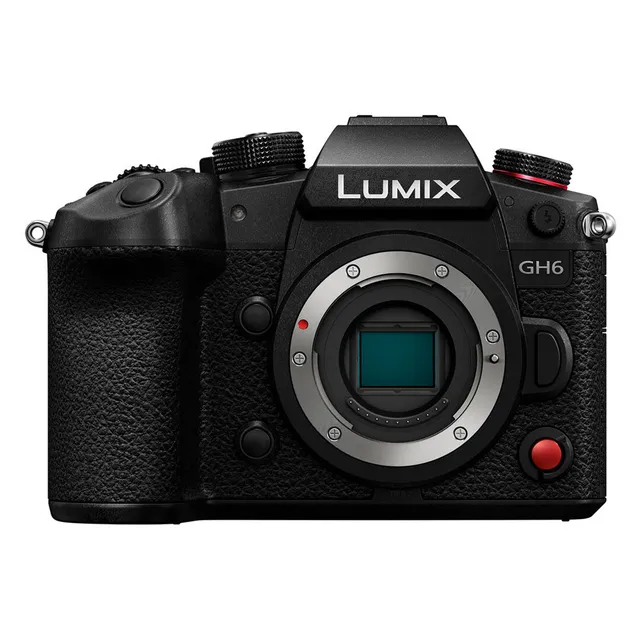
Technical specifications
- Sensor
- 4/3" Live MOS sensor
- Sensor Size
- 17.3 x 13 mm
- Megapixels
- 25.21
- Mount
- Micro Four Thirds Mount
- Max Resolution
- 5728 x 3024
- Max Frame Rate
- 120 fps (4K), 300 fps (FHD)
- Codec
- MP4, MOV, Apple ProRes
- Dynamic Range
- 13+ stops
- ISO Range
- ISO 100–25600
- Log / Gamma
- V-Log, HLG, Cinelike D2, Cinelike V2
- Autofocus
- 315 areas
- Stabilization
- 5-axis image sensor shift, Dual I.S.2
- Ports
- USB-C, HDMI Type A, 3.5mm audio
- Battery
- DMW-BLK22
- Weight
- 823g
- Dimensions
- 138.4 mm x 100.3 mm x 99.6 mm
- MSRP
- $2,200
- Released
- 2022
Add your voice
Your ratings help other filmmakers choose the right camera.
Own it?
What do you use this for?
Field guide
Overview
The Panasonic Lumix GH6 is a powerhouse Micro Four Thirds mirrorless camera designed specifically for high-end video production and content creation. It sits at the top of the Lumix G series, positioning itself as a serious tool for filmmakers who need professional-grade features like internal ProRes recording, high-bitrate MOV files, and advanced timecode synchronization, all in a compact, weather-sealed body. It is a direct competitor to high-end cinema cameras and hybrid mirrorless systems, offering a robust feature set that prioritizes reliability and image quality for demanding productions.
What sets the GH6 apart is its deep integration of professional video tools. The manual highlights its ability to record 5.8K resolution, internal Apple ProRes, and a variety of high-frame-rate options, including 4K120p. It also features a built-in cooling fan, which is a critical addition for long-form recording, and a sophisticated 5-axis image stabilization system that works in tandem with compatible lenses. The camera also includes advanced monitoring tools like waveform monitors, vector scopes, and luminance spot meters, making it a true 'cinema-in-a-box' for those who know how to leverage them.
This camera is an excellent choice for documentary filmmakers, independent cinematographers, and content creators who need a reliable, feature-rich camera that can handle long shooting days. Its robust build, combined with its extensive video-centric menu system, makes it ideal for productions where flexibility and high-quality output are paramount, whether you are shooting in a studio or out in the field.
Pros & Cons
Pros
Internal Apple ProRes recording provides a professional-grade codec for high-quality post-production workflows.
Built-in cooling fan allows for extended, reliable recording times without the risk of overheating.
Advanced monitoring tools like waveform monitors and vector scopes are built directly into the camera, reducing the need for external monitors.
Dual card slots (CFexpress Type B and SD UHS-II) offer flexible and secure recording options, including backup and relay recording.
5-axis image stabilization system provides up to 7.5 stops of compensation, which is excellent for handheld shooting.
Cons
High-resolution recording modes like 4K120p or high-bitrate MOV files require expensive CFexpress cards, as they cannot be recorded to standard SD cards.
The Micro Four Thirds sensor size is smaller than full-frame alternatives, which may be a disadvantage for extreme low-light performance or shallow depth-of-field looks.
The camera's extensive menu system and professional features can be overwhelming for beginners or those used to simpler hybrid cameras.
The cooling fan, while necessary, adds bulk to the camera body, making it larger than some other mirrorless options.
Some advanced features, such as certain high-frame-rate modes, have limitations on autofocus performance or require specific lens compatibility.
Best Settings
Narrative Filmmaking
Use the [MOV] file format for maximum editing flexibility. Set [Rec Quality] to a high-bitrate 10-bit 4:2:2 mode (e.g., C4K/60p/422/10-I) to ensure the best color grading potential. Use [V-Log] Photo Style for maximum dynamic range, and enable [V-Log View Assist] to monitor with a LUT applied.
Documentary / Run-and-Gun
Set [Rec. File Format] to [MP4] for easier file management and compatibility. Use [Continuous AF] set to [MODE1] for reliable focus tracking. Enable [Wind Noise Canceller] if shooting outdoors with the built-in microphone, and keep [Image Stabilizer] set to [Normal] for handheld stability.
Interview & Talking Head
Use [4K/10bit/100M/30p] for a balance of quality and file size. Set [Photo Style] to [Standard] or [Natural] for a clean, ready-to-use look. Ensure [Sound Rec Level] is manually adjusted to avoid clipping, and use the [Luminance Spot Meter] to ensure the subject's skin tones are properly exposed.
Slow Motion
Use [Variable Frame Rate] or [High Frame Rate Video] modes. Note that [Variable Frame Rate] requires [MOV] format and may disable audio recording. For 4K slow motion, use [C4K/120p] settings, but be aware of potential autofocus limitations at these high frame rates.
Common Issues
Camera Overheating Warning
What's happening: A warning icon appears on the screen indicating a temperature rise. Why: Continuous high-bitrate recording or high-frame-rate shooting in warm environments can cause the internal temperature to rise. Fix: Stop recording and allow the camera to cool down. Ensure the fan inlet and outlet are not obstructed. Prevention: Use the [Thermal Management] setting to adjust the temperature threshold if necessary, and avoid blocking the cooling vents.
Recording Stops Unexpectedly
What's happening: Video recording stops before the expected time. Why: This is often due to the card's writing speed being insufficient for the selected [Rec Quality] or the card reaching capacity. Fix: Ensure you are using a card that meets the required speed class for your chosen recording format. Format the card using the camera's [Card Format] function. Prevention: Check the [Rec Quality] requirements in the manual and use high-speed CFexpress cards for demanding formats.
Autofocus Hunting or Inaccuracy
What's happening: The camera struggles to lock focus or hunts continuously. Why: This can occur in low-contrast scenes, low-light conditions, or when the subject is outside the focus range. Fix: Use the [Focus Limiter] to restrict the focus range, or switch to [MF] (Manual Focus) and use [Focus Peaking] to assist with manual focusing. Prevention: Ensure the lens contacts are clean and that you are using an appropriate AF mode for the subject movement.
Audio Issues or Low Volume
What's happening: Recorded audio is too quiet or has unwanted noise. Why: Incorrect gain settings or wind noise interference. Fix: Adjust the [Sound Rec Level Adj.] manually. If outdoors, enable [Wind Noise Canceller] or [Wind Cut]. Prevention: Monitor audio levels using headphones and the [Audio Information] display during recording.
FAQ
- Can the Panasonic Lumix GH6 record 4K at 120fps?
Yes, the Panasonic Lumix GH6 supports 4K recording at 120fps. You must use a compatible CFexpress Type B card for this recording quality, as it cannot be recorded to an SD card.
- What memory cards are compatible with the Panasonic Lumix GH6?
The Panasonic Lumix GH6 features a dual card slot system. Slot 1 supports CFexpress Type B cards (64 GB to 512 GB), and Slot 2 supports SD, SDHC, and SDXC memory cards (up to 256 GB, UHS-I/UHS-II UHS Speed Class 3, and Video Speed Class 90).
- Does the Panasonic Lumix GH6 have a cooling fan?
Yes, the Panasonic Lumix GH6 includes a built-in cooling fan to prevent overheating during extended video recording sessions. You can manage the fan operation via the [Fan Mode] setting in the [Custom] menu.
- Can I record Apple ProRes on the Panasonic Lumix GH6?
Yes, the Panasonic Lumix GH6 supports internal Apple ProRes recording. This is available when the [Rec. File Format] is set to [Apple ProRes] and requires the use of a CFexpress card for certain resolutions.
- Is the Panasonic Lumix GH6 weather-sealed?
The Panasonic Lumix GH6 is designed to be 'Splash Resistant,' offering protection against moisture, water, and dust. However, this does not guarantee that damage will not occur if the camera is subjected to direct contact with water, and it works best when used with compatible weather-resistant lenses.
- How do I update the firmware on the Panasonic Lumix GH6?
You can update the firmware by downloading the latest version from the official Panasonic support website. Save the file to the root directory of your memory card, insert it into the camera, and navigate to [Firmware Version] in the [Setup] ([Others]) menu to initiate the update.
- Does the Panasonic Lumix GH6 support timecode synchronization?
Yes, the Panasonic Lumix GH6 supports timecode synchronization. It includes a BNC conversion cable for TC IN/OUT, allowing you to synchronize the timecode with external devices.
- Can I use my old Micro Four Thirds lenses on the Panasonic Lumix GH6?
Yes, the Panasonic Lumix GH6 uses the Micro Four Thirds lens mount, making it compatible with a wide range of existing Micro Four Thirds lenses. Note that some functions, such as specific autofocus or stabilization features, may vary depending on the lens.
Recommended Accessories
Related comparisons
The LUMIX GH7 dominates with phase-detect AF and internal ProRes RAW; the GH6 remains a strong value for internal ProRes 422 HQ.
See full comparison LUMIX GH6 vs X-S20The Fujifilm X-S20 excels for hybrid shooters needing portability; the LUMIX GH6 dominates dedicated video with internal ProRes.
See full comparison