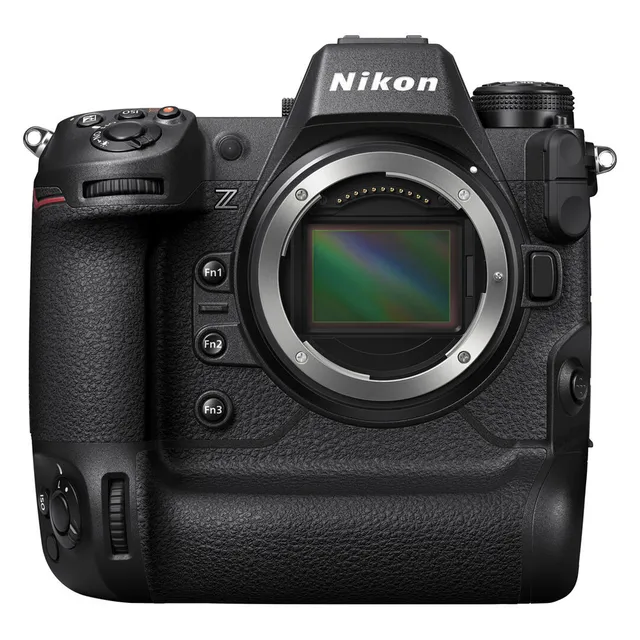
Technical specifications
- Sensor
- Full-Frame CMOS
- Sensor Size
- 35.9 x 23.9 mm
- Megapixels
- 45.7
- Mount
- Nikon Z
- Max Resolution
- 6K (7680x4320)
- Max Frame Rate
- 100fps @ 4K UHD
- Codec
- ProRes, H.265, H.264
- ISO Range
- ISO 32–102400
- Log / Gamma
- HDR-HLG, Nikon N-Log
- Autofocus
- Phase-detect, 493 points
- Stabilization
- Sensor-Shift, 5-Axis
- Ports
- 1x HDMI, 1x 1/8" / 3.5 mm TRS Stereo Headphone, 1x 1/8" / 3.5 mm TRS, 1x USB-C, 1x Nikon 10-Pin Remote, 1x PC Flash Sync, 1x RJ45 Data, 1x USB-C Data Output (Shared with Power Input)
- Battery
- 1x EN-EL18d Rechargeable Lithium-Ion, 10.8 VDC, 3300 mAh (Included)<br>• Approx. 700 Shots
- Weight
- 1160g
- Dimensions
- 149 x 149.5 x 90.5 mm
- Released
- 2021
Add your voice
Your ratings help other filmmakers choose the right camera.
Own it?
What do you use this for?
Field guide
Overview
The Nikon Z 9 is a powerhouse flagship mirrorless camera designed for professional sports, wildlife, and high-end studio production. It represents a significant shift for Nikon, ditching the mechanical shutter entirely in favor of a high-speed stacked CMOS sensor. This design choice allows for blackout-free shooting and incredible burst rates, positioning it as a direct competitor to the Sony A1 and Canon EOS R3. It is a heavy-duty, integrated-grip body built to withstand the rigors of daily professional use.
Beyond its speed, the Z 9 is a formidable video tool, capable of internal 8K recording and a variety of professional codecs like ProRes 422 HQ. The manual highlights its sophisticated subject detection, which can automatically track people, animals, and vehicles, making it a versatile choice for hybrid shooters who need to switch between high-speed stills and high-resolution video on the fly. The inclusion of dual CFexpress Type B slots ensures that the camera can keep up with the massive data throughput required for its highest quality settings.
This camera is best suited for working professionals who need absolute reliability and speed. Whether you are shooting a fast-paced football match, a wildlife documentary, or a high-end commercial project, the Z 9 provides the performance and build quality to handle the job. Its size and weight make it less ideal for casual travel, but for those who need a 'do-it-all' workhorse, it is currently one of the most capable systems on the market.
Pros & Cons
Pros
Blackout-free electronic viewfinder provides a seamless shooting experience, essential for tracking fast-moving subjects.
Internal 8K video recording eliminates the need for external recorders, simplifying the rig for high-resolution productions.
Advanced subject detection (people, animals, vehicles) significantly reduces the cognitive load on the photographer during high-pressure shoots.
Dual CFexpress Type B slots provide high-speed, reliable storage and backup options for critical professional work.
Robust, weather-sealed, integrated-grip body design offers excellent ergonomics and durability for long days on set.
Cons
The lack of a mechanical shutter means you must be aware of potential flicker or banding issues under certain artificial lighting conditions.
The large, integrated-grip body is significantly heavier and bulkier than standard mirrorless cameras, which may be a drawback for gimbal work.
High-speed frame capture modes (C30/C120) have specific restrictions, such as recording in JPEG only, which limits post-processing flexibility.
The camera can become warm during extended 8K recording or high-speed burst sessions, potentially triggering thermal warnings.
The sheer volume of data generated by 8K and high-speed bursts requires expensive, high-capacity CFexpress cards and significant storage infrastructure.
Best Settings
Narrative Filmmaking
Use N-Log for maximum dynamic range and color grading flexibility. Set the camera to 4K or 8K in ProRes 422 HQ (10-bit) to ensure high-quality footage. Always use a manual white balance (e.g., 5600K) for consistent color across takes.
Documentary / Run-and-Gun
Use Auto-area AF with Subject Detection set to 'Auto' to ensure the camera tracks subjects reliably. Set the camera to H.265 10-bit for a good balance between file size and image quality. Enable 'View Assist' if shooting in N-Log to make the monitor image easier to judge.
Interview & Talking Head
Use Single-point AF or Wide-area AF (S) with 'People' subject detection enabled to lock onto the eyes. Set the camera to 4K 24p or 30p. Use a fixed ISO (e.g., 800) to avoid exposure shifts during the interview.
Slow Motion
Use 4K 120p for high-quality slow motion. Note that this will require a higher shutter speed (e.g., 1/250s) to maintain the 180-degree shutter rule. Ensure you are using a fast CFexpress card to handle the high data rate.
Common Issues
Camera unresponsive or won't turn off
What's happening: The camera stops responding to inputs or fails to power down. Why: A process may be hung, or the camera is still writing data to the card. Fix: Wait for the memory card access lamp to stop blinking. If it persists, remove and reinsert the battery. Prevention: Always wait for the access lamp to turn off before removing the battery or card.
Viewfinder or monitor won't turn on
What's happening: The displays remain black. Why: The monitor mode may be set incorrectly, or the eye sensor is dirty. Fix: Press the monitor mode button to cycle through modes. Clean the eye sensor with a blower. Prevention: Keep the eye sensor area clean and free of dust.
Shutter won't release
What's happening: The camera refuses to take a photo. Why: No memory card is inserted, the card is full, or the camera is in a mode that prevents shooting (like 'Bulb' in mode S). Fix: Check for a card, ensure space is available, and verify your shooting mode settings. Prevention: Regularly check your remaining shots and card status in the shooting display.
Overheating during video
What's happening: The camera stops recording or displays a temperature warning. Why: Extended use in high-resolution modes (8K) or high ambient temperatures. Fix: Turn the camera off and allow it to cool down. Prevention: Avoid direct sunlight and use the camera in well-ventilated areas when shooting long-form video.
FAQ
- Can the Nikon Z 9 shoot 8K video?
Yes, the Nikon Z 9 can record 8K UHD video at 30p, 25p, and 24p. This is a key feature for high-resolution production workflows.
- What memory cards does the Nikon Z 9 use?
The Nikon Z 9 uses CFexpress (Type B) and XQD memory cards. For high-speed frame capture and 8K video, cards with a transfer rate of at least 250 MB/s are recommended.
- Does the Nikon Z 9 have a mechanical shutter?
No, the Nikon Z 9 does not have a mechanical shutter. It relies entirely on its high-speed stacked CMOS sensor for image capture.
- How many focus points does the Nikon Z 9 have?
The Nikon Z 9 features 493 focus points in photo mode when using single-point AF with the FX image area.
- Can the Nikon Z 9 track animals and vehicles?
Yes, the Nikon Z 9 includes subject detection options for people, animals, and vehicles. You can select these in the photo shooting and video recording menus.
- What is the maximum frame rate for the Nikon Z 9?
The Nikon Z 9 can reach up to 120 fps in high-speed frame capture (C120) mode, though this is limited to JPEG format.
- Is the Nikon Z 9 weather-sealed?
The Nikon Z 9 is built for professional use and features a robust, weather-sealed body designed to withstand challenging environments.
- How do I update the firmware on the Nikon Z 9?
Firmware updates can be downloaded from the Nikon Download Center. You then copy the file to a memory card and use the camera's menu to perform the update.
Recommended Accessories
- ProGrade Digital CFexpress Type B Cards — essential for 6K ProRes recording speeds. Shop on Amazon
- SmallRig Full Camera Cage for Z9 — adds mounting points and protects the robust body. Shop on Amazon
- Nikon FTZ II Mount Adapter — seamlessly integrates F-mount lenses with Z-mount body. Shop on Amazon
- CFexpress Type B Cards — high-speed media for 6K video and rapid burst shooting. Shop on Amazon
- Nikon WT-7A Wireless Transmitter — enhances network capabilities for professional tethering and FTP. Shop on Amazon
- SmallRig Baseplate with 15mm Rods — builds out a robust rig for matte boxes and follow focus. Shop on Amazon
Related comparisons
The Nikon Z9 is a robust workhorse for demanding productions; the Sony a1 is a compact speed demon for ultimate versatility.
See full comparison Z9 vs Z8The Z8 delivers flagship performance in a compact body; the Z9 offers unmatched battery life and robust build for demanding productions.
See full comparison