Technical specifications
- Sensor
- APS-C BSI
- Sensor Size
- 23.5 x 15.6 mm
- Megapixels
- 40.2
- Mount
- FUJIFILM X
- Max Resolution
- 6K (6240x3140)
- Max Frame Rate
- 240fps @ 1080p
- Codec
- H.265, H.264
- ISO Range
- ISO 80–51200
- Log / Gamma
- FUJIFILM F-Log, FUJIFILM F-Log2
- Autofocus
- Phase-detect, 425 points
- Stabilization
- Sensor-Shift, 5-Axis
- Ports
- 1x Micro-HDMI, 1x 1/8" / 3.5 mm TRS, 1x USB-C, 1x 2.5 mm Sub-Mini Remote, 1x USB-C (USB 3.2 / 3.1 Gen 2) Data Output (Shared with Power Input)
- Battery
- 1x NP-W235 Rechargeable Lithium-Ion (Included)<br>• Approx. 580 Shots
- Weight
- 476g
- Dimensions
- 129.5 x 91 x 63.8 mm
- MSRP
- $1,699
- Released
- 2022
Add your voice
Your ratings help other filmmakers choose the right camera.
Own it?
What do you use this for?
Field guide
Overview
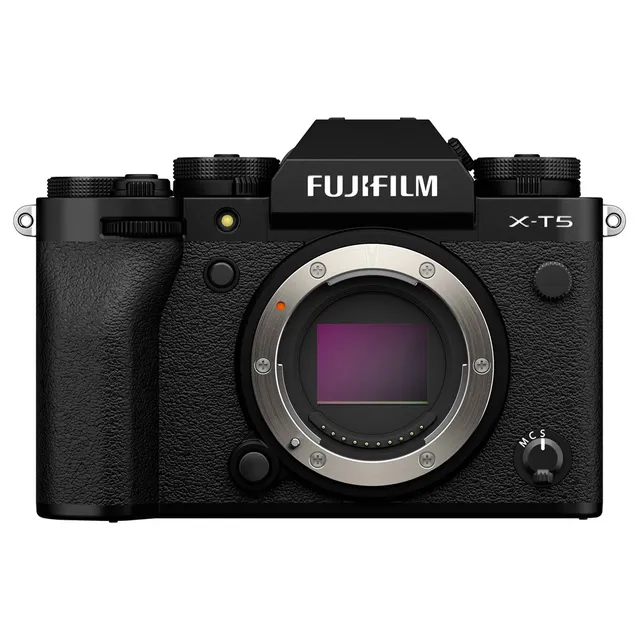
The Fujifilm X-T5 is a high-performance mirrorless camera that leans heavily into the classic, tactile shooting experience that has defined the X-series. Positioned as a powerful tool for both stills and video, it features a 40.2MP X-Trans CMOS 5 HR sensor, making it an excellent choice for photographers who prioritize resolution and detail. Its design remains faithful to the traditional dial-based interface, offering dedicated controls for shutter speed, ISO, and exposure compensation, which appeals to purists and professionals alike.
Beyond its stills capabilities, the X-T5 is a capable video machine, supporting high-quality 4K recording with 6.2K oversampling. It includes advanced features like F-Log/HLG recording, internal 4:2:2 10-bit recording, and a variety of professional monitoring tools like zebras and focus peaking. The camera also features a 3-way tilting LCD monitor, which is a significant advantage for those who need to shoot from high or low angles without the bulk of a fully articulating screen.
This camera is ideal for street, landscape, and portrait photographers who want high resolution in a compact, weather-sealed body. Filmmakers will also find it a compelling option for run-and-gun documentary work, provided they are comfortable with the specific crop factors and workflow requirements of the X-mount system.
Pros & Cons
Pros
40.2MP sensor provides exceptional detail for large prints and heavy cropping.
Tactile, dial-based controls allow for rapid setting adjustments without diving into menus.
3-way tilting LCD monitor is perfect for low-angle and portrait-orientation shooting.
Dual SD card slots (UHS-II) provide essential redundancy for professional workflows.
In-body image stabilization (IBIS) significantly improves handheld shooting stability.
Cons
High-resolution 40MP sensor requires high-quality glass to truly resolve the detail.
4K/120p recording is not available; high-speed recording is limited to specific modes.
The 3-way tilt screen is less versatile for vlogging compared to a fully articulating screen.
The camera can become warm during extended 4K recording sessions.
The menu system is deep and can be overwhelming for users new to the Fujifilm ecosystem.
Best Settings
Narrative Filmmaking
- Mode: Manual (M)
- Codec: MOV (H.265 10-bit 4:2:2)
- Resolution/Frame Rate: 4K (16:9) at 23.98P or 24P for a cinematic look.
- Picture Profile: F-Log or F-Log2 for maximum dynamic range in post-production.
- Audio: Manual level adjustment; use an external XLR adapter if professional audio is required.
Documentary / Run-and-Gun
- Mode: Aperture Priority (A)
- Codec: MOV (H.264 10-bit 4:2:0)
- Resolution/Frame Rate: 4K (16:9) at 29.97P.
- Focus: Continuous AF (AF-C) with Face/Eye Detection enabled.
- Stabilization: IBIS set to CONTINUOUS.
Interview & Talking Head
- Mode: Manual (M)
- Resolution/Frame Rate: 4K (16:9) at 23.98P.
- Audio: Internal mic level set to MANUAL; monitor via headphones using the supplied adapter.
- Focus: Single AF (AF-S) or Manual Focus with Focus Peaking enabled.
Slow Motion
- Mode: Manual (M)
- Resolution/Frame Rate: High Speed Rec set to 120P or 240P.
- Note: High-speed movies are recorded without sound and may have a crop factor depending on the settings.
Common Issues
Camera Not Turning On
- What's happening: The camera fails to power up when the switch is moved to ON.
- Why: The battery may be exhausted, inserted incorrectly, or the battery-chamber cover is not fully latched.
- Fix: Charge the battery, ensure it is inserted in the correct orientation, and verify the battery-chamber cover is securely closed.
- Prevention: Always carry a spare, fully-charged battery and check the battery level indicator before important shoots.
Overheating During Video Recording
- What's happening: The camera displays a temperature warning or shuts down during long recording sessions.
- Why: High-resolution video recording generates significant heat.
- Fix: Turn the camera off and allow it to cool down. If necessary, set the Auto Power Off Temp. to HIGH in the Power Management menu.
- Prevention: Use a tripod to avoid holding the camera, and ensure the area around the camera is well-ventilated.
Autofocus Not Locking
- What's happening: The focus frame turns red and the camera fails to lock focus.
- Why: The subject may be low-contrast, too dark, or outside the camera's focus range.
- Fix: Use focus lock on a different subject at the same distance, or switch to manual focus.
- Prevention: Ensure the focus area is appropriately sized for the subject and that the subject is well-lit.
No Sound in Movie Playback
- What's happening: Videos play back without audio.
- Why: The playback volume may be set too low, or the speaker may be obstructed.
- Fix: Adjust the playback volume in the Sound Setting menu and ensure the speaker is not covered by your hand or accessories.
- Prevention: Check audio levels before and during recording using the on-screen meters.
FAQ
- Can the Fujifilm X-T5 shoot 4K at 60fps?
Yes, the Fujifilm X-T5 supports various frame rates for 4K recording. Please check the Movie Mode settings in the menu to select the desired frame rate and resolution combination.
- What memory cards are compatible with the Fujifilm X-T5?
The Fujifilm X-T5 uses SD, SDHC, and SDXC memory cards. It supports UHS-II bus interfaces, which are recommended for high-speed burst photography and high-bitrate video recording.
- Does the Fujifilm X-T5 have in-body image stabilization?
Yes, the Fujifilm X-T5 features in-body image stabilization (IBIS) to help reduce camera shake during handheld shooting.
- How do I update the firmware on my Fujifilm X-T5?
You can check your current firmware version by turning the camera on while holding the DISP/BACK button. Firmware updates are available on the official Fujifilm support website and should be installed using a memory card.
- Can I use the Fujifilm X-T5 as a webcam?
Yes, the Fujifilm X-T5 can be used as a webcam. You need to set the Connection Mode to USB WEBCAM in the network/USB settings menu and connect the camera to your computer via USB.
- What is the battery life of the Fujifilm X-T5?
Battery life varies based on usage and settings. Under CIPA standards, the NP-W235 battery provides approximately 570 shots in standard performance mode. Using Boost mode or recording video will reduce this duration.
- Does the Fujifilm X-T5 support RAW recording?
Yes, the Fujifilm X-T5 supports RAW recording. You can choose between Uncompressed, Lossless Compressed, and Compressed RAW formats in the Image Quality Setting menu.
- How do I format a memory card in the Fujifilm X-T5?
You can format a memory card by navigating to the User Setting menu and selecting Format. Be aware that this will delete all data on the card.