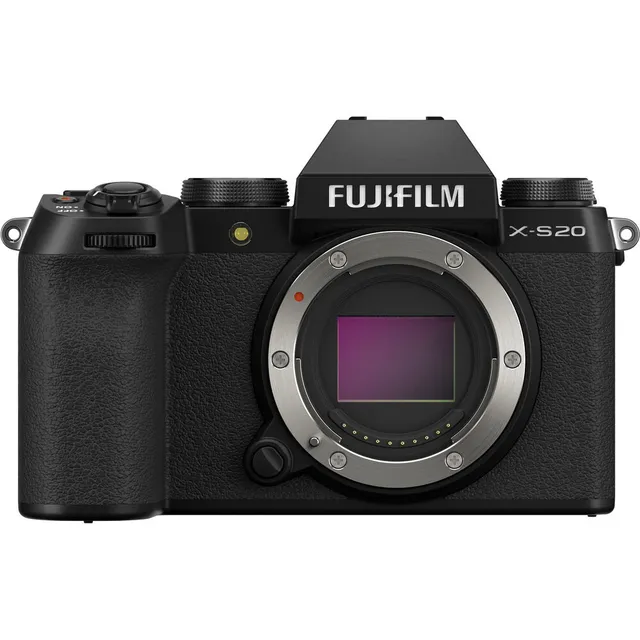
Technical specifications
- Sensor
- APS-C CMOS
- Sensor Size
- 23.5 x 15.6 mm
- Megapixels
- 26.1
- Mount
- FUJIFILM X
- Max Resolution
- 6K (6240x4160)
- Max Frame Rate
- 240fps @ 1080p
- Codec
- H.265, H.264
- ISO Range
- ISO 80–51200
- Autofocus
- Phase-detect, 117 points
- Stabilization
- Sensor-Shift, 5-Axis
- Ports
- 1x Micro-HDMI, 1x 1/8" / 3.5 mm TRS Stereo Headphone, 1x 1/8" / 3.5 mm TRS, 1x USB-C Input/Output, 1x USB-C Remote Input (Shared with Power Input)
- Battery
- 1x NP-W235 Rechargeable Lithium-Ion (Included)
- Weight
- 410g
- Dimensions
- 127.7 x 85.1 x 65.4 mm
- Released
- 2023
Add your voice
Your ratings help other filmmakers choose the right camera.
Own it?
What do you use this for?
Field guide
Overview
The Fujifilm X-S20 emerges as a compelling hybrid camera, meticulously crafted for content creators and filmmakers who demand versatility without compromise. Positioned to appeal to a broad audience, from aspiring vloggers to seasoned cinematographers, it offers a robust suite of features that bridge the gap between high-quality still photography and advanced video production. This camera is designed to be a single, powerful tool capable of handling diverse shooting scenarios, making it a strong contender in the competitive mirrorless market.
This camera truly shines with its extensive video capabilities, including F-Log and HLG recording for maximum post-production flexibility, and the ability to output RAW footage via HDMI to external recorders like Atomos and Blackmagic Design. The inclusion of an optional cooling fan is a significant advantage for extended recording sessions, effectively mitigating thermal concerns. Its intelligent hybrid autofocus system, complete with advanced subject detection for faces, eyes, animals, and vehicles, ensures critical focus even with dynamic and challenging subjects, a feature that's invaluable for both stills and motion.
Filmmakers, vloggers, and content creators seeking a compact yet powerful camera that excels in both stills and video should seriously consider the X-S20. Its advanced in-body image stabilization (IBIS), high-speed recording options, and professional audio capabilities make it suitable for a wide range of productions—from narrative shorts and documentaries to vlogs and interviews—offering a comprehensive and adaptable toolkit for creative expression.
Pros & Cons
Pros
Advanced Video Codecs: Supports H.265 (10-bit 4:2:2/4:2:0) and H.264 (8-bit 4:2:0) MOV/MP4, offering excellent image quality and flexibility for post-production workflows, especially with F-Log/HLG recording.
Dedicated Vlog Mode: Features a specific Vlog mode that optimizes settings for video blogs and allows for touch control adjustments, streamlining the workflow for solo content creators.
External Cooling Fan Support: The optional FAN-001 cooling fan allows for significantly longer non-stop movie recording, a critical feature for demanding shoots where overheating is a concern.
Comprehensive Image Stabilization: Combines in-body (IBIS), optical (OIS), and digital (DIS) stabilization, providing robust shake compensation for handheld shooting, even in challenging conditions.
Intelligent Subject Detection AF: Offers advanced autofocus with detection for faces, eyes, animals, and vehicles, ensuring sharp focus on moving subjects, which is invaluable for dynamic video and photography.
RAW Output via HDMI: Capable of outputting RAW footage to external Atomos and Blackmagic Design recorders, providing maximum flexibility for color grading and professional workflows.
Customizable Controls: Extensive customization options for function buttons, command dials, and the quick menu allow users to tailor the camera to their specific shooting style and frequently used settings.
Versatile Audio Recording: Supports 2-channel and 4-channel (with XLR adapter) LPCM 24-bit/48kHz audio recording, along with internal and external mic level adjustments, wind filter, and low-cut filter, offering professional audio control.
Cons
High-Speed Video Limitations: High-speed movies (100P-240P) are recorded without sound and the footage is compressed, limiting their use in scenarios requiring synchronized audio or uncompressed quality.
RAW Output Restrictions: RAW footage output is disabled in some movie and high-speed recording modes, and incompatible HDMI devices will display it as a mosaic, requiring careful planning of external recording setups.
Electronic Shutter Drawbacks: Using the electronic shutter can introduce distortion with moving subjects, banding under fluorescent lights, and restricts ISO sensitivity (160-12800), making it less versatile than the mechanical shutter in certain situations.
Aperture Ring Disabled in Movie Optimized Control: When "MOVIE OPTIMIZED CONTROL" is enabled, the aperture ring is disabled, forcing aperture adjustments via command dials, which might disrupt muscle memory for lens-based aperture users.
Battery Drain with Performance Features: Features like PRE-AF, Bluetooth, and "BOOST" performance mode significantly increase battery drain, necessitating spare batteries or external power for extended shoots.
Slow USB Charging: Charging the NP-W235 battery via USB from a computer is slow (approx. 600 minutes with 5V/500mA input) and stops if the camera is turned on, making it impractical for quick recharges on location.
External Microphone Compatibility: Only external microphones connecting via 3.5mm jacks are supported, and microphones requiring plug-in power cannot be used, potentially limiting choices for audio professionals.
Dynamic Range Bracketing ISO Restriction: When dynamic range bracketing is active, sensitivity is restricted to a minimum of ISO 640, which might be a limitation in very low-light bracketing scenarios.
Best Settings
Narrative Filmmaking
For narrative work, you'll want maximum flexibility in post-production. Set your F-Log/HLG RECORDING to F-Log2 or F-Log to capture the widest dynamic range for color grading. Pair this with the H.265 ALL-I 422 MOV codec for 10-bit, intra-frame compression, ensuring the highest quality and most robust files for editing. For audio, use an XLR MIC ADAPTER SETTING with 4ch XLR+CAMERA to capture quadraphonic sound, providing ample options for sound design. Focus should be MANUAL FOCUS for precise control over depth of field, and ensure IBIS/OIS is enabled for smooth, stable shots, especially if shooting handheld. Output RAW footage via HDMI to an external recorder like an Atomos or Blackmagic for the cleanest possible signal.
Documentary / Run-and-Gun
In fast-paced documentary or run-and-gun scenarios, reliability and efficiency are key. Set your FOCUS MODE to CONTINUOUS AF and enable SUBJECT DETECTION (e.g., ANIMAL, AUTOMOBILE, FACE/EYE DETECTION) to keep your subjects sharp without constant manual intervention. For stabilization, use IBIS/OIS + DIS to combat severe camera shake while moving. To maximize recording time and prevent thermal shutdowns, attach the optional FAN-001 cooling fan and set COOLING FAN SETTING to AUTO2 or HIGH. Choose H.265 LongGOP 420 MOV for a good balance of image quality and smaller file sizes, allowing for longer continuous recording. For audio, set INTERNAL MIC LEVEL ADJUSTMENT to AUTO and enable WIND FILTER and LOW CUT FILTER to manage ambient noise on the fly.
Interview & Talking Head
For controlled interview setups, prioritize clean audio and a cinematic look. Again, F-Log/HLG RECORDING set to F-Log2 or F-Log is ideal for grading. Use H.265 ALL-I 422 MOV for 10-bit quality. For audio, connect external microphones via the XLR MIC ADAPTER SETTING set to 2ch XLR ONLY for stereo sound, or 4ch XLR+CAMERA if you need more channels, and manually adjust EXTERNAL MIC LEVEL ADJUSTMENT for optimal levels. Consider using MANUAL FOCUS for precise control over your subject's sharpness and to achieve a shallow depth of field. If using a wide aperture lens, enable BACKGROUND DEFOCUS MODE in Vlog mode to automatically set the widest aperture for a pleasingly blurred background. Ensure IBIS/OIS is active for any subtle camera movements.
Slow Motion
When capturing high-speed action for slow-motion playback, navigate to HIGH SPEED REC. Select the highest available frame rates like 240P or 200P for maximum slow-down effect. Be aware that high-speed movies are recorded without sound, so plan for external audio or music. For stabilization, IBIS/OIS + DIS is crucial to maintain smooth footage at these high frame rates. Note that the footage recorded to the memory card is compressed to maintain the selected bit rate, so choose a fast UHS-II V60 or better card for optimal performance.
Common Issues
Camera does not turn on
- What's happening: The Fujifilm X-S20 camera remains off despite attempting to power it on.
- Why: This can be due to an uncharged or exhausted battery, incorrect battery insertion, or an unlatched battery-chamber cover.
- Fix: Ensure the NP-W235 battery is fully charged (charging takes about 180 minutes). Reinsert the battery correctly, making sure it's oriented as shown in the manual (P 34). Confirm the battery-chamber cover is securely latched (P 34). If the battery is old and no longer holds a charge, it may need replacement.
- Prevention: Always charge batteries before important shoots. Keep a spare, fully-charged battery on hand. Double-check battery insertion and cover latching before powering on.
Battery drains quickly
- What's happening: The Fujifilm X-S20's battery life is shorter than expected.
- Why: Several factors can contribute, including cold temperatures, dirty battery terminals, continuous autofocus (PRE-AF) being enabled, using AUTO shooting mode, or an aged battery. Bluetooth/SMARTPHONE SETTING also increases drain.
- Fix: Warm the battery in a pocket before use in cold conditions. Clean battery terminals with a dry cloth. Turn off PRE-AF (GAF/MF SETTING > PRE-AF > OFF, P 154). Avoid AUTO mode for extended battery life; choose a different shooting mode (P 68). Check BATTERY AGE (DUSER SETTING > BATTERY AGE, P 273) and replace if old. Turn off Bluetooth when not in use.
- Prevention: Optimize camera settings for battery endurance. Carry multiple charged batteries, especially in cold weather. Regularly clean battery terminals.
Memory card errors or recording interruptions
- What's happening: The camera displays "CARD ERROR," "WRITE ERROR," or movie recording is interrupted.
- Why: This can be caused by an unformatted, damaged, or incompatible memory card, dirty card contacts, or removing the card/turning off the camera during recording/formatting. Slow write speed can also interrupt movie recording.
- Fix: Format the memory card in the camera (DUSER SETTING > FORMAT, P 270). Clean memory card contacts with a soft, dry cloth. If the issue persists, try a different, compatible memory card (UHS-II V60 or better for high bit rate movies). Do not turn off the camera or remove the card while recording or formatting.
- Prevention: Always format new memory cards in the camera. Use recommended high-speed memory cards for movie recording. Never remove the card or power off the camera during data operations.
Autofocus struggles with certain subjects
- What's happening: The Fujifilm X-S20's autofocus system fails to achieve focus, or the focus frame turns red.
- Why: The autofocus system may struggle with very shiny, reflective, dark, insubstantial (smoke/flame), low-contrast subjects, or subjects positioned against high-contrast backgrounds. The focus area might also be too small.
- Fix: Use focus lock (press shutter halfway) or switch to manual focus (GAF/MF SETTING > FOCUS MODE > MANUAL FOCUS, P 108). Increase the size of the focus area (GAF/MF SETTING > FOCUS AREA, P 98). For poorly lit subjects, shoot in better light or use the AF-assist illuminator (xFAF ILLUMINATOR > ON, P 155).
- Prevention: Understand the limitations of autofocus. For challenging subjects, anticipate focus needs and be ready to switch to manual focus or adjust the focus area size.
No sound in movie playback
- What's happening: Movies play back without audio on the camera or connected TV.
- Why: This can be due to playback volume being too low, the microphone or speaker being obstructed, or the camera's sound settings being disabled. High-speed movies are recorded without sound.
- Fix: Adjust playback volume (DSOUND SET-UP > PLAYBACK VOLUME, P 277, or during playback using focus stick). Ensure the camera's microphone and speaker are not obstructed. Check that SOUND & FLASH is set to ON (DUSER SETTING > SOUND & FLASH > ON, P 274). Remember that high-speed movies (100P-240P) inherently have no sound.
- Prevention: Always check audio settings before recording. Perform test recordings to confirm audio capture. Be mindful of high-speed recording limitations.
Camera overheats and shuts down
- What's happening: The camera displays a temperature warning and automatically turns off.
- Why: Continuous use, especially in high ambient temperatures, can cause the camera or battery temperature to rise, triggering an automatic shutdown to protect the device.
- Fix: Turn the camera off and wait for it to cool down. Remove the battery and allow it to cool. If using the optional FAN-001 cooling fan, ensure it's attached and set to AUTO2 or HIGH (xFCOOLING FAN SETTING, P 177).
- Prevention: Use the optional cooling fan for extended recording. Set AUTO POWER OFF TEMP. to HIGH (DPOWER MANAGEMENT > AUTO POWER OFF TEMP. > HIGH, P 302) to extend recording time, but use a tripod to avoid prolonged contact with the camera at high temperatures. Avoid direct sunlight. Turn off the camera when not in use.
Flash does not fire
- What's happening: The built-in or external flash does not activate when taking a picture.
- Why: The flash may be disabled in settings, the electronic shutter is active, the battery is exhausted, the camera is in bracketing/continuous mode, or the flash is lowered.
- Fix: Check FLASH FUNCTION SETTING (FFLASH SETTING > FLASH FUNCTION SETTING, P 178) to ensure the flash is enabled. If the electronic shutter is active, switch to mechanical or mechanical+electronic shutter (ASHOOTING SETTING > SHUTTER TYPE, P 172). Charge or replace the battery. Switch to single frame drive mode (P 5). Raise the built-in flash (P 123).
- Prevention: Verify flash settings and camera mode before shooting. Keep batteries charged. Be aware of shutter type limitations with flash.
Pictures are blurred
- What's happening: Captured images appear out of focus or blurry.
- Why: This can be due to a dirty or blocked lens, the camera failing to achieve focus (indicated by a red focus frame), or camera shake during a slow shutter speed.
- Fix: Clean the lens with a soft cloth and blower. Ensure no objects are obstructing the lens. If the focus frame is red, check focus before shooting (P 49) or switch to manual focus. Use a tripod for slow shutter speeds to prevent camera movement.
- Prevention: Regularly clean your lens. Confirm focus before pressing the shutter fully. Use appropriate shutter speeds or stabilization (IBIS/OIS/DIS) for handheld shooting, or a tripod for static shots with slow shutter speeds.
FAQ
- What memory card does the Fujifilm X-S20 use?
The Fujifilm X-S20 uses SD, SDHC, and SDXC memory cards. It supports both UHS-I and UHS-II bus interfaces, with UHS-II cards recommended for high-speed burst photography and movie recording at higher bit rates (V60 or better for 360 Mbps, UHS Speed Class 3 or better for 100/200 Mbps). Always format memory cards in the camera before first use to ensure optimal performance and prevent data corruption.
- How do I charge the Fujifilm X-S20 battery?
The Fujifilm X-S20 comes with an NP-W235 rechargeable battery. You can charge it by connecting the camera to the supplied AC power adapter (AC-5VJ) using the USB cable. Charging takes approximately 180 minutes. Alternatively, you can use an optional BC-W235 dual battery charger, which can charge two batteries in about 200 minutes (or as little as 150 minutes with a 30W or above power supply).
- Can the Fujifilm X-S20 record high-speed slow-motion video?
Yes, the Fujifilm X-S20 can record high-speed movies. It supports frame advance rates of 240P, 200P, 120P, and 100P for Full HD (16:9 or 17:9 aspect ratios). These high-speed recordings are played back in slow motion, allowing you to view fast-moving subjects in detail. However, it's important to note that high-speed movies are recorded without sound, so external audio solutions or music will be needed in post-production.
- What are the audio capabilities of the Fujifilm X-S20 for movie recording?
The Fujifilm X-S20 offers versatile audio recording. It can record 2-channel LPCM (24-bit, 48 kHz sampling) or AAC (MP4 only) sound via its built-in microphone or a 3.5mm external microphone. With the optional TEAC TASCAM CA-XLR2d-F XLR microphone adapter, it can record four-channel LPCM (24-bit, 48 kHz sampling) sound. The camera also features internal and external mic level adjustments, a mic level limiter, wind filter, and low-cut filter for enhanced audio control.
- Does the Fujifilm X-S20 support external cooling fans?
Yes, the Fujifilm X-S20 supports the optional FAN-001 cooling fan. This accessory helps keep the camera cool during extended periods of non-stop movie recording, preventing thermal shutdowns. Fan speed can be adjusted via the COOLING FAN SETTING in both photo and movie menus, with options for automatic or continuous low/high speed operation. This is particularly useful for long takes in warm environments.
- Can I use the Fujifilm X-S20 as a webcam?
Yes, the Fujifilm X-S20 can be used as a webcam. To enable this, select "USB WEBCAM" for CONNECTION MODE in the network/USB settings menu. Then, connect the camera to your computer via USB and turn the camera on. You can then select the camera in your desired application for use as a webcam, making it a versatile tool for streaming or video conferencing.
- What are the RAW video output options for the Fujifilm X-S20?
The Fujifilm X-S20 can output RAW footage to external recorders connected via HDMI. It specifically supports RAW output to ATOMOS and Blackmagic Design video recorders, providing maximum flexibility for color grading and professional workflows. However, RAW output is disabled in some movie and high-speed recording modes, and incompatible HDMI devices may display the footage as a mosaic, so ensure your external recorder is compatible.
- How do I customize the quick menu on the Fujifilm X-S20?
To customize the quick menu on the Fujifilm X-S20, press and hold the Q button during shooting. This will display the quick menu. Use the focus stick to highlight an item you wish to change, then press MENU/OK. You can add, remove, or reorder items from a list of available shooting menu options, allowing you to tailor the menu to your most frequently used settings for efficient workflow.
- What is F-Log/HLG recording on the Fujifilm X-S20?
F-Log and HLG (Hybrid Log-Gamma) recording on the Fujifilm X-S20 are specialized gamma curves designed for professional video workflows. F-Log and FLog2 offer gentle gamma curves with wide color gamuts, ideal for extensive color grading in post-production. HLG conforms to the international ITU-R BT2100 standard, capturing high-contrast scenes with vivid colors for HLG-compatible displays, providing an HDR-ready output directly from the camera.
- How does image stabilization work on the Fujifilm X-S20?
The Fujifilm X-S20 features a comprehensive image stabilization system. It combines in-body image stabilization (IBIS) with optical image stabilization (OIS) from compatible lenses. Additionally, it offers digital image stabilization (DIS) which can be enabled alongside IBIS/OIS for even more severe camera shake compensation. The IS MODE BOOST option further enhances stabilization for very steady shots, though it may not be suitable for panning movements.
- What is the battery life for movie recording on the Fujifilm X-S20?
The battery life for movie recording on the Fujifilm X-S20 varies by mode and settings. With the NP-W235 battery, you can expect approximately 85 minutes for 6.2K (29.97fps), 80 minutes for 4K (59.94fps), and 95 minutes for Full HD (59.94fps) of actual movie capture. Continuance battery life is higher, around 120-150 minutes. High-speed movies at 120fps offer about 95 minutes of actual capture, but remember these figures are approximate and can vary with usage and temperature.
- Can I use third-party flash units with the Fujifilm X-S20?
Yes, you can use third-party shoe-mounted flash units with the Fujifilm X-S20. However, it is critical to ensure that these units do not apply over 300V to the camera hot shoe, as this could cause damage to the camera's internal electronics. The camera supports TTL flash control with compatible units, and offers various flash modes like TTL, Manual, and Multi, allowing for flexible lighting setups.
Recommended Accessories
Related comparisons
The Fujifilm X-S20 offers 6K video and 240fps 1080p; the Sony a6700 provides superior autofocus and pro codecs.
See full comparison X-S20 vs LUMIX GH6The Fujifilm X-S20 excels for hybrid shooters needing portability; the LUMIX GH6 dominates dedicated video with internal ProRes.
See full comparison