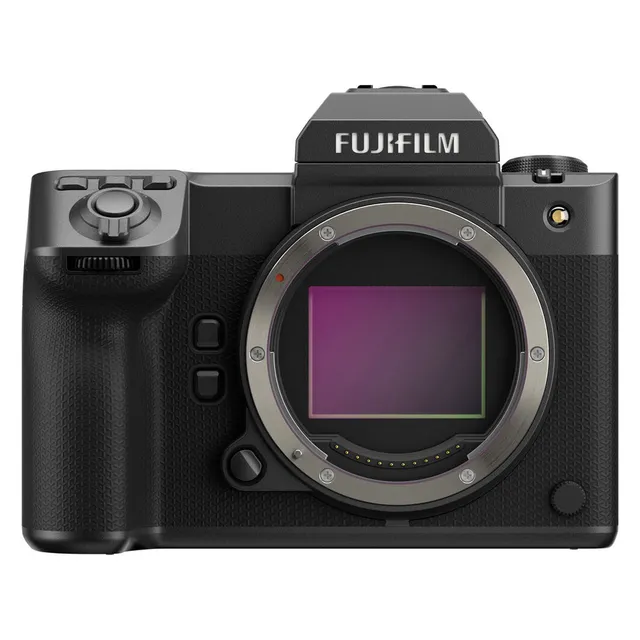
Technical specifications
- Sensor
- Medium Format CMOS
- Sensor Size
- 43.8 x 32.9 mm
- Megapixels
- 102
- Mount
- FUJIFILM G
- Max Resolution
- 6K (8192x4320)
- Max Frame Rate
- 120fps @ 1080p
- Codec
- ProRes, H.265, H.264
- ISO Range
- ISO 40–102400
- Autofocus
- 425 AF points
- Stabilization
- Sensor-Shift, 5-Axis
- Ports
- 1x HDMI, 1x 1/8" / 3.5 mm TRS Stereo Headphone, 1x 1/8" / 3.5 mm TRS, 1x USB-C, 1x RJ45 Data, 1x USB-C Data Output (Shared with Power Input)
- Battery
- 1x NP-W235 Rechargeable Lithium-Ion (Included)<br>• Approx. 540 Shots
- Weight
- 949g
- Dimensions
- 152.4 x 117.4 x 98.6 mm
- MSRP
- $7,499
- Released
- 2023
Add your voice
Your ratings help other filmmakers choose the right camera.
Own it?
What do you use this for?
Field guide
Overview
The Fujifilm GFX100 II is a powerhouse medium-format mirrorless camera designed for high-end commercial, studio, and landscape photographers who demand uncompromising resolution and image quality. Positioned as a flagship, it competes with high-resolution full-frame systems by offering a significantly larger sensor, providing a unique look and depth that smaller formats struggle to replicate. It is a serious tool for professionals who need massive files for large-format printing or extensive cropping in post-production.
Beyond its 102MP sensor, the GFX100 II is surprisingly capable for video, supporting internal ProRes recording and various log profiles like F-Log and F-Log2. The manual highlights its advanced connectivity, including Frame.io Camera to Cloud integration, tethered shooting via Ethernet, and the ability to record to external SSDs, making it a versatile choice for modern, high-end production workflows.
This camera is best suited for studio photographers, high-end landscape artists, and cinematographers working on productions where the medium-format aesthetic is a creative requirement. Its robust build and extensive feature set make it a reliable, albeit heavy, workhorse for demanding professional environments.
Pros & Cons
Pros
102MP medium-format sensor provides unmatched resolution and image depth for large-format output
Internal ProRes recording and F-Log2 support make it a viable cinema camera for high-end productions
Frame.io Camera to Cloud integration streamlines professional workflows by uploading files directly from the set
Dual card slots (CFexpress Type B and SD) offer flexible and reliable storage options
Detachable memory card slot cover allows for easier access when the camera is rigged in a cage
Cons
Massive file sizes require significant storage and high-performance computing power for editing
High-resolution sensor and advanced video features can lead to heat buildup, requiring the optional cooling fan for long takes
Large sensor size and body design make it less portable than full-frame mirrorless alternatives
16-bit RAW recording is restricted to specific drive modes, limiting flexibility in some shooting scenarios
Complex menu system and extensive feature set require a steep learning curve for new users
Best Settings
Narrative Filmmaking
- Codec: ProRes 422 HQ (via internal recording to CFexpress)
- Profile: F-Log2 for maximum dynamic range and color grading flexibility
- Resolution/Frame Rate: 4K or 8K depending on delivery requirements; use 23.98P for a cinematic look
- Audio: 24-bit/48kHz LPCM via XLR adapter for professional sound capture
Documentary / Run-and-Gun
- Codec: H.265 LongGOP 422 MOV for a balance of quality and file size
- Profile: F-Log or HLG for easier post-production
- Focus: Continuous AF (AF-C) with Subject Detection enabled for reliable tracking of moving subjects
- Stabilization: IBIS/OIS + DIS for handheld stability
Interview & Talking Head
- Codec: H.265 ALL-I 422 MOV for high-quality, intra-frame compression
- Profile: Standard or a custom Film Simulation for a 'baked-in' look
- Audio: Internal Mic Level Adjustment set to manual to avoid auto-gain pumping
Slow Motion
- Mode: High Speed Rec enabled
- Frame Rate: 120P or 100P for smooth slow-motion playback
- Note: High-speed movies are recorded without sound; ensure you have a fast CFexpress card to handle the data rate.
Common Issues
Camera Will Not Turn On
- What's happening: The camera fails to power up when the switch is moved to ON.
- Why: The battery may be exhausted, inserted incorrectly, or the battery-chamber cover is not fully latched.
- Fix: Charge the battery, reinsert it in the correct orientation, or ensure the battery-chamber cover is securely latched.
Mottling or Noise in Images
- What's happening: Images appear mottled or noisy, especially at high sensitivities.
- Why: This is often normal at high ISOs or when the camera has been used continuously for long periods, causing the sensor to heat up.
- Fix: Use pixel mapping (USER SETTING > SENSOR CLEANING) to address bright spots. If the camera is hot, turn it off and allow it to cool down.
Memory Card Errors
- What's happening: The camera displays a 'CARD ERROR' or 'CARD NOT INITIALIZED' message.
- Why: The card may be unformatted, damaged, or have dirty contacts.
- Fix: Clean the contacts with a soft, dry cloth. If the error persists, format the card using the camera's internal format function (USER SETTING > FORMAT). If the card is still not recognized, replace it.
Overheating During Video Recording
- What's happening: The camera displays a temperature warning or shuts down during long recording sessions.
- Why: High-resolution video recording generates significant heat.
- Fix: Use the optional FAN-001 cooling fan. Set the 'AUTO POWER OFF TEMP.' to 'HIGH' in the power management menu to extend recording time, though this is only recommended when using a tripod.
FAQ
- Can the Fujifilm GFX100 II record to an external SSD?
Yes, the Fujifilm GFX100 II can save still images and movies to an external SSD connected to the USB-C port. The camera automatically switches the recording destination to the SSD when it is detected.
- What memory cards does the Fujifilm GFX100 II use?
The camera features two slots: Slot 1 is for Type B CFexpress cards, and Slot 2 is for SD, SDHC, or SDXC cards. CFexpress cards are recommended for high-speed burst photography and high-bitrate video.
- Does the Fujifilm GFX100 II support 16-bit RAW?
Yes, 16-bit RAW is available, but it is restricted to specific drive modes, including STILL IMAGE and PIXEL SHIFT MULTI SHOT.
- How do I update the firmware on the Fujifilm GFX100 II?
You can check the current firmware version by turning the camera on while holding the DISP/BACK button. Firmware updates are then performed using a memory card containing the update file, which can be downloaded from the official Fujifilm support website.
- Is the Fujifilm GFX100 II weather-sealed?
The manual does not explicitly state an IP rating, but it does note that the camera and its accessories should be protected from rain, steam, and dust. It also mentions that the optional vertical battery grip is not waterproof.
- Can the Fujifilm GFX100 II be used as a webcam?
Yes, the camera can be connected to a computer via USB for use as a webcam. You must select '6: USB WEBCAM' in the SELECT CONNECTION SETTING menu.
- What is the battery life of the Fujifilm GFX100 II?
Battery life varies based on settings and usage. In performance mode with the LCD, you can expect approximately 540 shots, while using the EVF in boost mode reduces this to approximately 370 shots. Battery endurance will decline at low temperatures.
- Does the Fujifilm GFX100 II have a cooling fan?
The camera does not have a built-in cooling fan, but it supports an optional external cooling fan (FAN-001) that can be attached to the back of the camera to allow for longer periods of non-stop movie recording.
Recommended Accessories
- GF 110mm f/2 R LM WR Lens — exceptional portrait lens, leveraging medium format's shallow DOF. Shop on Amazon
- Atomos Ninja V+ — external recording for higher bitrate ProRes RAW or other formats. Shop on Amazon
- Tilta Full Camera Cage — essential for mounting accessories and protecting the larger body. Shop on Amazon
- TetherPro USB-C to USB-C Cable — reliable, fast data transfer for studio tethering. Shop on Amazon