Technical specifications
- Sensor
- Four Thirds CMOS
- Sensor Size
- 17.78 x 10 mm
- Mount
- Micro Four Thirds
- Max Resolution
- 4K UHD (3840x2160)
- Max Frame Rate
- 60fps @ 4K UHD
- Codec
- Blackmagic RAW
- Dynamic Range
- 13 stops
- ISO Range
- ISO 0–25600
- Log / Gamma
- Film, Extended Video, Video
- Stabilization
- Lens-based optical stabilization (can be disabled)
- Ports
- 1x HDMI 2.0, 1x Micro BNC (12G-SDI), 1x Micro BNC (12G-SDI), 1x 1/8" / 3.5 mm TRS, 1x Barrel (12VDC), 1x USB-C (USB 3.2 / 3.1 Gen 1) Video/Data/Control Input/Output
- Battery
- Built-In Lithium-Ion
- Weight
- 300g
- Dimensions
- 84 x 66 x 69.6 mm
- MSRP
- $995
- Released
- 2023
Add your voice
Your ratings help other filmmakers choose the right camera.
Own it?
What do you use this for?
Field guide
Overview
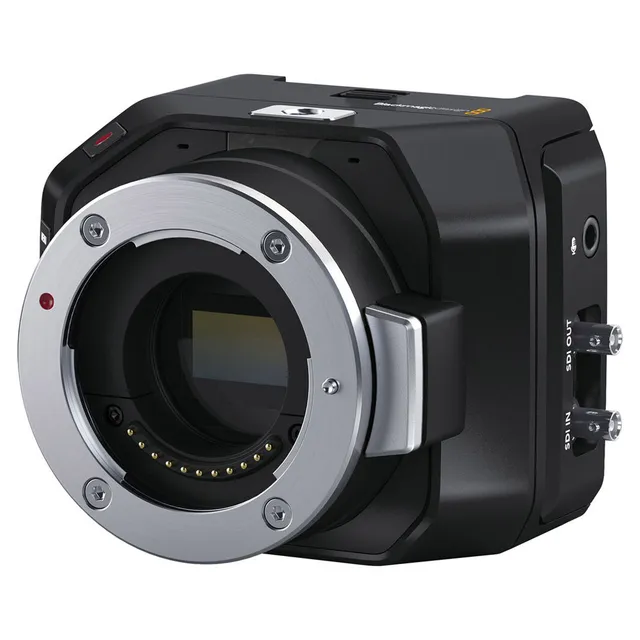
The Blackmagic Micro Studio Camera 4K G2 is a specialized, ultra-compact 4K camera designed primarily for live production environments. Its tiny form factor makes it an ideal choice for mounting in tight, hard-to-reach locations or at extreme angles where traditional studio cameras would be impractical. It effectively bridges the gap between a small remote camera and a full-featured studio unit, offering 12G-SDI connectivity for high-quality HD and Ultra HD output up to 2160p60.
What sets this camera apart is its high ISO, wide dynamic range 4K sensor, which performs well even in challenging, dimly lit studio environments. It utilizes Blackmagic’s Generation 5 color science, ensuring professional-grade color reproduction. Furthermore, the camera supports recording Blackmagic RAW directly to external USB-C flash disks, providing cinematographers with the flexibility to perform high-quality color grading in post-production, a feature rarely found in this class of remote studio cameras.
This camera is best suited for live broadcast productions, multi-camera studio setups, and remote camera operations where space is at a premium. It is an excellent tool for directors and producers who need to capture unique angles without sacrificing image quality or professional control features like tally and remote camera management via ATEM switchers.
Pros & Cons
Pros
Ultra-compact form factor allows for placement in tight, creative, or hidden locations.
12G-SDI connectivity supports high-quality HD and Ultra HD output up to 2160p60.
Supports Blackmagic RAW recording to external USB-C drives for superior post-production flexibility.
Dual native ISO sensor provides excellent performance in low-light studio conditions.
Seamless integration with ATEM switchers for tally and remote camera control via HDMI or SDI.
Cons
Requires external USB-C storage for RAW recording, adding to the rig's footprint.
No built-in screen; requires an external monitor or ATEM switcher for framing and menu navigation.
Limited battery life when using internal LP-E6/LP-E6N batteries; best suited for powered studio setups.
Requires optional Blackmagic Focus and Zoom Demand accessories for manual lens control, increasing total system cost.
Small form factor may lead to heat management challenges during extended high-bitrate recording sessions.
Best Settings
Narrative Filmmaking
Use the 'Film' dynamic range setting to maximize information for color grading in DaVinci Resolve. Record in Blackmagic RAW (Constant Quality Q0 or Q3) to retain the highest possible image quality and metadata.
Documentary / Run-and-Gun
Use 'Extended Video' dynamic range for a pleasing, high-contrast look that requires minimal post-processing. Set shutter speed to double your frame rate (e.g., 1/50 for 25p) for natural motion blur.
Interview & Talking Head
Set the camera to 'Video' dynamic range for a broadcast-ready look. Use the 'Iris + Shutter' auto-exposure mode to maintain consistent exposure while keeping depth of field controlled.
Slow Motion
Enable 'Off Speed Recording' and set the sensor frame rate higher than your project frame rate (e.g., 60fps sensor rate for a 24fps project).
Common Issues
Dropped Frames
What's happening: The camera displays a dropped frame indicator. Why: The connected USB-C flash disk is too slow to handle the selected codec and resolution. Fix: Use a faster, recommended USB-C flash disk. Check the Blackmagic support website for the latest list of compatible drives. Prevention: Always perform a speed test using the Blackmagic Disk Speed Test application before starting a critical shoot.
Flicker in Footage
What's happening: Visible flickering in the recorded video, especially under artificial lighting. Why: The shutter speed is not synchronized with the local mains power frequency. Fix: Adjust the shutter speed to a flicker-free value suggested by the camera, or set the correct local power frequency (50Hz or 60Hz) in the setup menu. Prevention: Always perform a test shoot under the specific lighting conditions of your location.
Tally Light Not Working
What's happening: The tally light does not illuminate when the camera is live. Why: The ATEM Camera ID may not be set correctly, or the camera is not properly connected to the switcher. Fix: Ensure the ATEM Camera ID in the camera's setup menu matches the input number on the ATEM switcher. If using HDMI, ensure the connection is secure. Prevention: Verify camera ID settings before every live production.
FAQ
- Can the Blackmagic Micro Studio Camera 4K G2 record internally?
No, the camera does not have internal storage. It records Blackmagic RAW directly to external USB-C flash disks connected via the USB-C expansion port.
- Does the Blackmagic Micro Studio Camera 4K G2 support tally lights?
Yes, the camera features a built-in tally light. When connected to an ATEM switcher, it automatically detects tally data and illuminates to indicate when the camera is on-air or in preview.
- What batteries are compatible with the Blackmagic Micro Studio Camera 4K G2?
The camera is compatible with LP-E6 or LP-E6N batteries, which fit into the rear battery slot.
- Can I control the Blackmagic Micro Studio Camera 4K G2 remotely?
Yes, you can control the camera via an ATEM switcher using the Camera Control feature in ATEM Software Control, or via REST APIs when connected to a network.
- Does the Blackmagic Micro Studio Camera 4K G2 have built-in image stabilization?
The camera supports image stabilization for compatible lenses. However, for the best results with gyro stabilization in DaVinci Resolve, it is recommended to disable lens-based optical stabilization.
- What is the maximum resolution and frame rate of the Blackmagic Micro Studio Camera 4K G2?
The camera supports resolutions up to Ultra HD and frame rates up to 2160p60 via its 12G-SDI output.
- How do I change settings on the Blackmagic Micro Studio Camera 4K G2?
You can change settings by connecting a monitor to the HDMI output and using the menu overlay, or by using the HUD controls directly on the HDMI display.
- Is the Blackmagic Micro Studio Camera 4K G2 compatible with Blackmagic Zoom and Focus Demand?
Yes, the camera supports these optional accessories for controlling focus and zoom when using compatible lenses.